Passkeys Explained: How the World Is Moving Beyond Passwords
Mira had checked into the hotel an hour earlier, and her phone’s battery had died somewhere over the Atlantic. She borrowed the front desk’s laptop to move some money before her card would work locally, opened her bank’s website, and stared at the login box. Her password manager was on the dead phone. She tried to recall the password itself — sixteen characters, a mix she’d generated months ago and never actually typed by hand — and got nowhere. A second attempt, a third, and the account locked for an hour “for your protection.”
It didn’t have to go that way. On a phone or laptop already set up with a passkey, the same login would have taken a face scan or a fingerprint — no password to remember, type, or lose to a dead battery in the first place. That gap between what happened to Mira and what a passkey-enabled login actually looks like is the entire story of this guide: not a hypothetical future, but a standard that major banks, email providers, and operating systems already support today.
Learn how passkeys, WebAuthn and FIDO2 replace passwords with public-key cryptography - a complete history, comparison tables and step-by-step setup guide.
Latest Story
Passkeys are a passwordless sign-in method built on public-key cryptography: instead of a secret you type and a service must store, your device holds a private key that never leaves it, and proves who you are by responding to a cryptographic challenge. They are the practical, consumer-facing result of a standard called WebAuthn, developed by the World Wide Web Consortium (W3C) together with the FIDO Alliance’s FIDO2 specifications. This guide traces how authentication got from a single 1961 mainframe password to today’s passwordless logins, explains exactly how the cryptography works, and separates official standards from vendor marketing so you can judge the real security trade-offs for yourself.
🧠 AI Overview Summary
A passkey is a passwordless credential based on public-key cryptography. Instead of a password stored on a server, your device holds a private key and proves your identity by signing a login challenge; a matching public key on the server verifies it. Built on the WebAuthn and FIDO2 standards from the W3C and FIDO Alliance, passkeys resist phishing because the private key never leaves your device and is cryptographically bound to the real website. They significantly reduce common password attacks, though no authentication method eliminates every risk.
Passkeys: Who, What, Why, When, Where, How
What This Guide Covers
- Passkeys replace a shared secret (password) with public-key cryptography, where only a public key is ever stored on a server.
- The private key that proves your identity is generated on, and never leaves, your device or security key.
- Passkeys are built on WebAuthn (a W3C web standard) and CTAP, together called FIDO2 — not a single company’s proprietary system.
- Because logins are cryptographically bound to the real website’s domain, passkeys resist the fake-login-page phishing that defeats passwords and most one-time codes.
- Platform passkeys (Touch ID, Windows Hello) sync through a device account; hardware security keys store credentials independently and don’t sync at all.
- Passkeys did not appear overnight in 2022 — the FIDO Alliance began standards work in 2012, and WebAuthn shipped in browsers by 2019.
- Biometric data used to unlock a platform passkey typically stays on the device; it is not sent to or stored by the website.
- No authentication method is unhackable. Passkeys reduce phishing and credential-stuffing risk substantially; device security and account recovery still matter.
- Passwords have not disappeared. Most services keep them as a fallback, and full passwordless-only login remains uncommon in 2026.
- Apple, Google, Microsoft, NIST, and the FIDO Alliance each publish separate guidance — this article keeps their claims clearly labelled and separate.
What a Passkey Actually Is
The short technical definition, and why it matters that a passkey is not just “a password you don’t type.”
Every password-based login relies on a shared secret: you know a string of characters, and so, somewhere on a server, does the website. That server-side copy is the entire reason password breaches matter — steal the database, and every password (or its hash) is exposed at once, ready to be tried against other sites where the same person reused it.
A passkey removes that shared secret entirely. When you create a passkey, your device generates a mathematically linked pair of keys: a private key, which stays on your device or security key and is never transmitted anywhere, and a public key, which is sent to the website and stored there. The two keys are related by a one-way mathematical function — the public key can verify a signature made by the private key, but cannot be used to derive or recreate the private key itself.
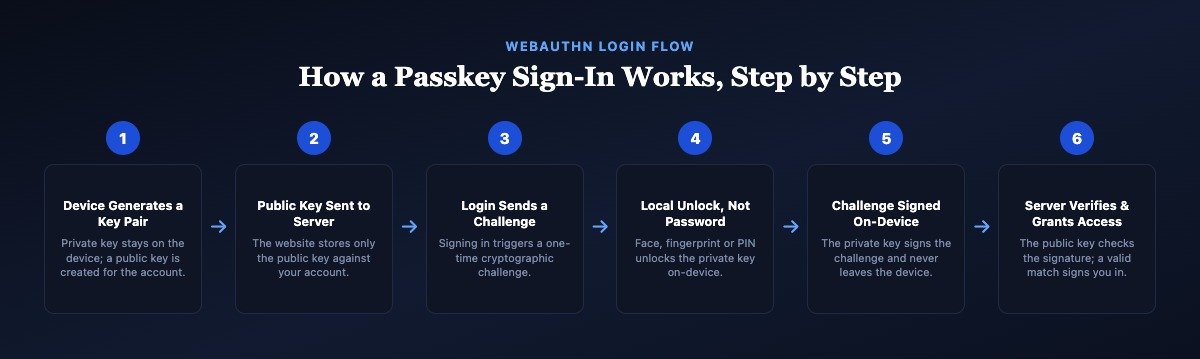
To sign in, the website sends a random “challenge.” Your device unlocks the private key using your device’s existing lock — a fingerprint, face scan, or PIN — and signs the challenge. The website checks that signature against the public key it already has on file. If it matches, you’re in. Nothing typed, nothing transmitted that could be reused elsewhere, and nothing stored server-side that’s worth stealing on its own.
📡 Technology Insight
Passkeys rely on public-key cryptography rather than shared secrets. This is a structural difference, not just a convenience upgrade: a stolen password database exposes credentials directly, while a stolen database of public keys exposes nothing an attacker can use to sign in, because the private key was never in it.
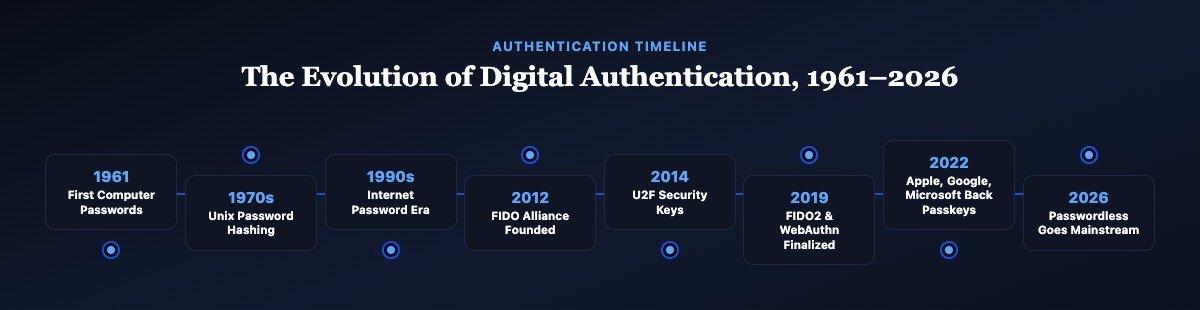
A Complete History of Digital Authentication
From the first computer password in 1961 to passwordless becoming the default in 2026 — historical milestones, technical standards, and where independent analysis fits in.
The First Computer Password
Historical background: MIT’s Compatible Time-Sharing System (CTSS), one of the earliest time-sharing computers, needed a way to give each researcher a private allocation of terminal time. Administrator Fernando Corbato is widely credited with introducing a login password to CTSS around 1961.
Technology breakthrough: The password was stored in a plain, unencrypted file, since hashing credentials was not yet standard practice — anyone with access to that file could read every user’s password directly.
Security significance: This was authentication’s original trade-off: a password worked in principle but was only ever as strong as the system storing it, a weakness that has echoed through six decades of breaches.
Industry adoption and current relevance: A widely told account of a graduate student encountering a printed CTSS password list made the exposure obvious almost immediately. Every subsequent decade of authentication design has, in part, responded to that first plaintext file.
Unix Introduces Password Hashing
Historical background: As Unix spread through universities and research labs in the 1970s, its password file was still readable by any user on the system, repeating CTSS’s original mistake at a larger scale.
Technology breakthrough: Robert Morris Sr. and Ken Thompson introduced one-way password hashing, based on the DES cipher, so the system stored a scrambled version of a password rather than the password itself, later adding a random “salt” to defeat precomputed lookup tables.
Security significance: Hashing meant someone who read the password file could not directly recover the original password — a foundational idea still used, in far more advanced form, in every password system today.
Industry adoption and current relevance: Salted password hashing became the baseline for virtually every password-based system built afterward, from mainframes to modern web applications, and remains standard practice.
The Internet Multiplies Password Fatigue
Historical background: As the web opened commerce and email to ordinary users, nearly every new website asked visitors to create yet another username and password.
Technology breakthrough: HTTPS and TLS began protecting passwords in transit between browser and server, but that only secured the journey — not what happened once the password reached either end.
Security significance: With dozens of accounts to manage, most people started reusing the same password across sites or choosing simple, memorable ones — the two habits that would drive decades of account breaches and credential-stuffing attacks.
Industry adoption and current relevance: Password managers emerged later in this era specifically to cope with the problem the open internet had created: too many accounts, too many passwords, too little memory.
Multi-Factor Authentication Goes Mainstream
Historical background: As phishing and credential theft grew more common through the mid-2000s, banks and enterprises began requiring a second proof of identity beyond a password.
Technology breakthrough: One-time codes delivered by hardware token, SMS text message, or later an authenticator app added a “something you have” factor alongside the password’s “something you know.”
Security significance: MFA meaningfully reduced account takeover from stolen or guessed passwords, though independent security research later showed SMS-based codes are vulnerable to SIM-swapping and interception.
Industry adoption and current relevance: By the early 2020s, MFA was standard practice for banking, email, and enterprise systems, establishing the expectation that a password alone was no longer sufficient.
OpenID and the Federated Login Experiment
Historical background: OpenID, and later OAuth, let users log into one website using an account from another provider — the origin of the now-familiar “Sign in with…” button.
Technology breakthrough: Federated identity meant a site no longer had to store its own password for a user at all; it could delegate verification to a trusted identity provider.
Security significance: Fewer stored passwords meant a smaller attack surface for each individual website, though it also concentrated risk onto the identity provider itself.
Industry adoption and current relevance: Federated login became common for consumer apps but never fully displaced traditional passwords, particularly for banking and enterprise systems that preferred to control authentication directly.
The FIDO Alliance Is Founded
Historical background: PayPal, Validity Sensors, and Nok Nok Labs founded the FIDO (Fast IDentity Online) Alliance in 2012 to pursue open, interoperable standards for strong authentication, explicitly aiming to reduce reliance on passwords.
Technology breakthrough: Rather than one company’s proprietary system, FIDO set out to build vendor-neutral specifications any browser, device, or website could implement.
Security significance: An open standard meant security improvements would not be locked to a single platform — a prerequisite for authentication that could work the same way across Apple, Google, Microsoft, and everyone else.
Industry adoption and current relevance: The Alliance grew to include most major technology companies and financial institutions, and its specifications now underpin the passkey standard used worldwide.
U2F Security Keys Arrive
Historical background: The FIDO Alliance published the Universal 2nd Factor (U2F) specification, and Google was among the first to deploy it internally and for Gmail users, alongside physical USB security keys from vendors like Yubico.
Technology breakthrough: A U2F key uses public-key cryptography and checks the website’s exact domain during login, so a fake phishing site cannot complete the authentication — unlike a typed one-time code, which a victim can be tricked into handing over.
Security significance: Google has reported that none of its more than 85,000 employees were successfully phished for work-account access after mandatory security-key use, one of the most cited real-world results in authentication security.
Industry adoption and current relevance: U2F keys remain in wide use today, especially for high-risk accounts such as IT administrators and journalists, and directly informed the design of FIDO2.
WebAuthn Becomes an Official W3C Standard
Historical background: The World Wide Web Consortium (W3C) published WebAuthn as an official web standard in March 2019, developed jointly with the FIDO Alliance’s complementary CTAP (Client to Authenticator Protocol) specification — together known as FIDO2.
Technology breakthrough: WebAuthn built public-key authentication directly into web browsers as a native API, so any website could request a cryptographic login without a plugin or proprietary software.
Security significance: Because the W3C also governs core web technologies like HTML and CSS, this gave passwordless login the same durable, vendor-neutral foundation as the rest of the open web.
Industry adoption and current relevance: Chrome, Firefox, Safari, and Edge all shipped WebAuthn support around this milestone; FIDO2 is the specification pair every modern passkey implementation is built on.
Platform Authenticators Adopt WebAuthn
Historical background: With WebAuthn ratified, browser vendors and platform makers spent 2020 extending support from external security keys to built-in “platform authenticators” — the fingerprint and face sensors already inside most laptops and phones.
Technology breakthrough: Windows Hello, Touch ID, and Android’s biometric APIs became usable as WebAuthn authenticators, meaning a device’s existing biometric sensor — not just an external key — could generate and protect a private key.
Security significance: This removed the need to buy a separate hardware key for everyday passwordless login, dramatically lowering the practical barrier to adoption for ordinary users.
Industry adoption and current relevance: This groundwork is the exact mechanism passkeys rely on today whenever a user unlocks a login with their face, fingerprint, or device PIN.
Apple, Google and Microsoft Commit to Passkeys
Historical background: In May 2022, Apple, Google, and Microsoft jointly announced expanded support for the FIDO Alliance’s multi-device credentials, which the industry began marketing under the shared consumer name “passkeys.”
Technology breakthrough: The key addition was cloud synchronisation: a passkey created on one device could now be securely backed up and made available across a user’s other devices through their platform account, without ever exposing the private key itself.
Security significance: Synced passkeys solved passwordless authentication’s biggest earlier weakness — losing the one device your credential lived on — while keeping the private key encrypted and inaccessible even to the platform storing the backup.
Industry adoption and current relevance: This announcement is widely treated as the public birth of “passkeys” as a mainstream consumer term, even though the underlying WebAuthn and FIDO2 standards were three years old by then.
Consumer Passkeys Roll Out at Scale
Historical background: Through 2023, major consumer platforms — including Google Accounts, Apple ID, PayPal, and numerous banks and retailers — switched on passkey support for hundreds of millions of user accounts.
Technology breakthrough: Google made passkeys the default, recommended sign-in method for Google Accounts in October 2023, a significant shift from offering passkeys only as an optional extra.
Security significance: Google has reported that passkey sign-ins were both faster and had a higher success rate than password-plus-second-factor sign-ins in its own account data.
Industry adoption and current relevance: 2023 marked the shift from passkeys as a security-conscious early-adopter feature to a mainstream option offered to any consumer, without requiring technical setup knowledge.
Enterprise Passkey Adoption Expands
Historical background: Enterprise identity providers, including Microsoft Entra ID and Okta, expanded passkey and FIDO2 support for workforce login throughout 2024, alongside growing government guidance recommending phishing-resistant MFA for higher-risk accounts.
Technology breakthrough: Enterprise deployments added device-bound passkey options — credentials that deliberately do not sync to the cloud — for the highest-security use cases, alongside synced passkeys for everyday convenience.
Security significance: Phishing-resistant authentication became a specific compliance and procurement requirement in some regulated sectors and government guidance, rather than a general best-practice suggestion.
Industry adoption and current relevance: Enterprises weighed passkeys against existing single sign-on and hardware-token investments, with rollout speed varying widely by industry, legacy systems, and regulatory requirements.
Cross-Platform Portability Improves
Historical background: Early passkey implementations sometimes locked a credential to a single vendor’s ecosystem, so a passkey created on an iPhone was not always easy to use from a Windows PC. Through 2025, the FIDO Alliance and platform vendors worked to close these gaps.
Technology breakthrough: Improvements to cross-device sign-in — scanning a QR code so a nearby device can authenticate using a phone’s passkey — and to credential-portability proposals made passkeys easier to use across ecosystems, though implementations still vary by platform.
Security significance: Better portability reduces the risk of users feeling locked into one vendor and reverting to a password as a fallback, which would undermine the security benefit passkeys are meant to provide.
Industry adoption and current relevance: Password managers such as 1Password and Bitwarden also added passkey storage and syncing, giving users a vendor-neutral option for managing passkeys across operating systems.
Passwordless Becomes the Default, Not the Exception
Historical background: Entering 2026, passkeys are offered — and in a growing number of cases, set as the default or recommended option — across most major consumer platforms, a growing share of banks, and an expanding list of enterprise identity systems.
Technology breakthrough: Continued refinement of recovery flows, cross-device sign-in, and platform interoperability has narrowed the practical gap between “using a passkey” and simply logging in the way people already expect an app to work.
Security significance: Phishing-resistant sign-in is now realistically available to typical consumers, not only to security-conscious enterprises and specialists, at least where a service has implemented passkey support.
Industry adoption and current relevance: Passwords have not disappeared — most services still keep them as a fallback — but for a growing number of everyday logins, the password is no longer the first, or even the recommended, option.
💡 Did You Know?
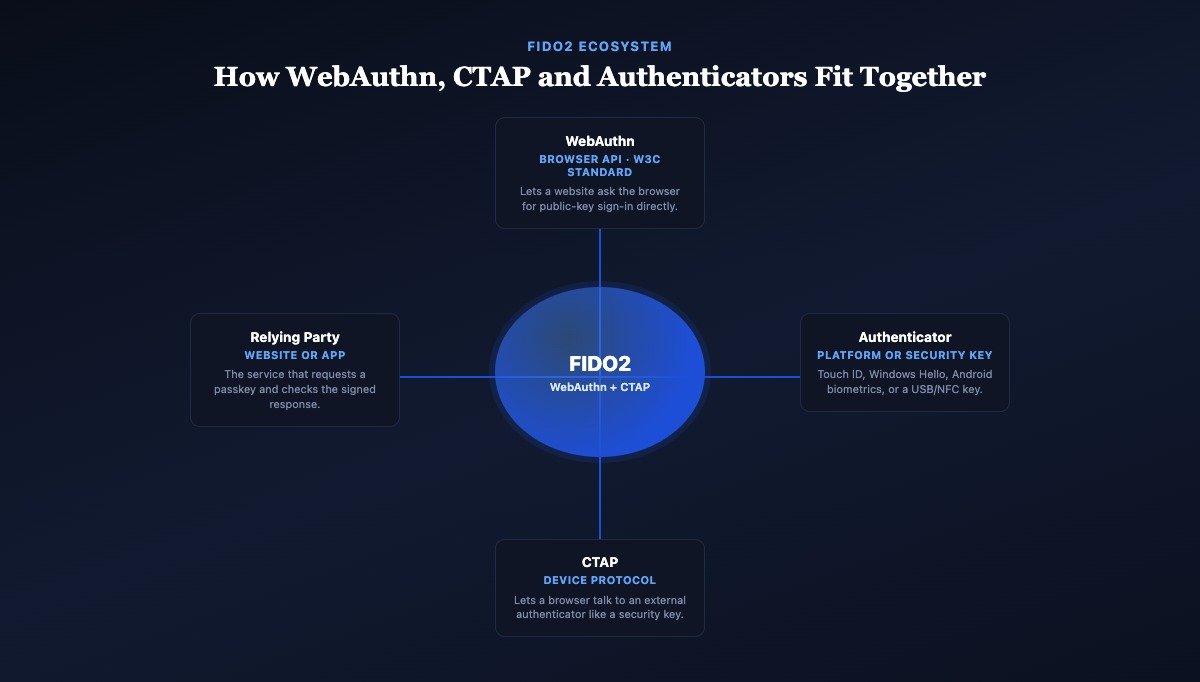
- The term “FIDO2” refers to a pair of specifications, not one: WebAuthn (the browser-facing API, standardised by the W3C) and CTAP (the device-facing protocol, published by the FIDO Alliance).
- Passkeys existed as a technical capability years before the word “passkey” became common marketing language in 2022 — the underlying WebAuthn standard shipped in browsers in 2019.
- A single passkey is specific to one website’s exact domain; it cannot be reused, copied, or tricked into authenticating a different, similar-looking site.
Key Terms in Passwordless Authentication
Precise definitions for the vocabulary used throughout this guide.
Passkey
A passwordless credential based on public-key cryptography that lets you sign in with a device unlock (biometric or PIN) instead of typing a password, using a linked key pair between your device and the website.
Password
A memorised or stored secret string used to prove identity, vulnerable to reuse, guessing, phishing, and data breaches because the same secret must be typed into any website that requests it.
Public-Key Cryptography
An encryption method using two mathematically linked keys: a public key that can be shared openly, and a private key that must stay secret. Passkeys use this method instead of a shared secret.
Private Key
The secret half of a public-key pair. In passkey systems it is generated and stored on the user’s device or hardware security key and never transmitted to a website.
Public Key
The shareable half of a public-key pair. A website stores a user’s public key and uses it to verify signatures created by the matching private key, without ever seeing the private key itself.
Biometric Authentication
Using a fingerprint, face scan, or similar trait to unlock a device or credential locally. With platform passkeys, the biometric data itself is not sent to the website — it only unlocks the local private key.
Platform Authenticator
A built-in device capability, such as Touch ID, Face ID, or Windows Hello, that can create and store a passkey directly on that device.
Roaming Authenticator (Security Key)
A separate physical device, typically connected by USB, NFC, or Bluetooth, that stores credentials independently of any single computer or phone — commonly used for high-security accounts.
WebAuthn
The Web Authentication API, a W3C standard that lets browsers request and verify public-key-based logins directly, without third-party plugins.
CTAP
Client to Authenticator Protocol, a specification that lets a computer or browser communicate with an external authenticator, such as a phone or security key, over USB, Bluetooth, or NFC.
FIDO2
The umbrella term for the combined WebAuthn and CTAP specifications. Together they define the modern standard that passkeys are built on.
Credential Manager
Software, built into an operating system, browser, or a standalone app, that stores, generates, and syncs a user’s passwords and, increasingly, their passkeys across devices.
Relying Party
The technical term for the website or application that requests authentication from a user. It stores the public key and verifies signed responses during login.
Attestation
An optional step where an authenticator provides cryptographic evidence about its own make, model, or security properties, letting a relying party set policies about which authenticators it trusts.
Five Things Worth Understanding Properly
Evergreen explainers that go one level deeper than the glossary above.
How Public-Key Cryptography Works
Public-key cryptography is the mathematical foundation underneath every passkey. Instead of one shared secret both sides must protect — the password model — it uses two mathematically related keys, generated together as a pair, where one can be published openly and the other must never leave its owner’s control.
The relationship between the two keys is a one-way function: it’s computationally straightforward to verify that a signature was produced by a specific private key, using only the corresponding public key, but effectively infeasible to work backward from the public key to reconstruct the private one with any known method or realistic amount of computing power. This is the same family of mathematics (elliptic-curve cryptography, in most modern passkey implementations) that already secures HTTPS connections across the web.
For a passkey specifically: your device generates the pair when you create the passkey, keeps the private key in a protected hardware area (a “secure enclave” or equivalent), hands the public key to the website, and later uses the private key only to sign login challenges — never to encrypt or transmit anything sensitive back and forth.
What Is WebAuthn?
WebAuthn (Web Authentication) is a W3C web standard, published as an official Recommendation in March 2019, that defines a JavaScript API letting any website ask a browser to create or use a public-key credential. It is the piece of FIDO2 that runs inside your browser.
Before WebAuthn, a website that wanted public-key authentication needed proprietary plugins or vendor-specific software. WebAuthn made the capability native: every major browser (Chrome, Safari, Firefox, Edge) implements the same API, so a developer writes one integration that works the same way regardless of which authenticator a visitor happens to use.
WebAuthn itself doesn’t dictate where a private key lives — that’s the job of an authenticator, whether a phone’s secure hardware or a USB security key. WebAuthn is the messenger between the website and that authenticator, using CTAP when the authenticator is external.
How FIDO2 Enables Passwordless Sign-In
FIDO2 is the combined name for WebAuthn (the browser-facing half) and CTAP (the device-facing half). Together, they let a website request a login, hand that request to whatever authenticator the user has — a phone, a laptop’s built-in sensor, or a physical security key — and receive back a cryptographically signed proof of identity, all without a password ever entering the exchange.
This split matters because it decouples “how the website asks” from “where the key lives.” A relying party doesn’t need to know or care whether the response came from an iPhone’s Face ID, a Windows laptop’s fingerprint reader, or a YubiKey plugged into a USB port — WebAuthn presents them all through the same interface, and CTAP is what lets an external device like a security key participate in that conversation.
Passkeys vs Password Managers
A traditional password manager and a passkey solve overlapping but distinct problems. A password manager generates, stores, and auto-fills strong, unique passwords — it makes password hygiene easier, but the website you’re logging into still only ever sees a password, with all of a password’s underlying weaknesses (it can still be phished, still be typed into a fake site, still be exposed if the website’s own database is breached).
A passkey changes what the website receives in the first place: never a secret at all, only a signed proof. Increasingly, the two overlap in practice — modern password managers such as 1Password, Bitwarden, iCloud Keychain, and Google Password Manager now also generate, store, and sync passkeys, functioning as a passkey’s credential manager as well as a legacy password vault.
What Happens If You Lose Your Phone?
This is the most common practical worry about passkeys, and the honest answer depends on which kind of passkey you’re using. A synced passkey (the default on most consumer platforms) is backed up, end-to-end encrypted, to your platform account — iCloud Keychain, Google Password Manager, or a third-party password manager — so signing into a new device with that same account restores your passkeys automatically.
A device-bound passkey (more common in enterprise deployments and on standalone hardware security keys) does not sync anywhere by design, for stricter security policies. Losing the only device holding it means falling back to whatever account-recovery method the website offers — often a backup code, a secondary authenticator, or identity verification through support. This is precisely why every major passkey provider recommends registering a second authenticator or backup method before you need it, not after.
🔐 Security Insight
Passkeys reduce the effectiveness of phishing because the private key never leaves the user’s device and never touches the website at all — there is no secret to type into a convincing fake login page, and the signature a device produces is cryptographically bound to the real site’s exact domain.
Passkeys by the Numbers: Head-to-Head Comparisons
How passkeys stack up against the authentication methods they’re gradually replacing.
| Factor | Passwords | Passkeys |
|---|---|---|
| What’s stored on the server | A password hash (a shared secret, one-way scrambled) | Only a public key — not a secret |
| Phishing resistance | Low — can be typed into a fake site | High — cryptographically bound to the real domain |
| Reuse across sites | Common, and risky, in practice | Not possible — each passkey is site-specific |
| Vulnerable to data breach exposure | Yes, if hashes are cracked or reused elsewhere | No — a leaked public key alone can’t sign in |
| User effort at login | Recall or type a string, often plus a second factor | One biometric scan or device PIN |
| Works fully offline on-device | Yes | Yes, for the local unlock step |
| Factor | Password Managers | Passkeys |
|---|---|---|
| What the website receives | Still a password (auto-filled, but still a shared secret) | A signed cryptographic response, never a secret |
| Phishing resistance | Improves habits, but a password can still be misused on a fake site | Structurally resistant — bound to the real domain |
| Setup burden | Low — works with any existing password-based site | Requires the website to support WebAuthn |
| Relationship between the two | Increasingly the same tool — modern managers store and sync both | |
| Factor | SMS OTP | Authenticator App | Passkey |
|---|---|---|---|
| Phishing resistance | Low — code can be relayed to attacker | Moderate — code can still be relayed | High — domain-bound cryptography |
| Known weakness | SIM-swapping, interception | Real-time phishing relay (“adversary in the middle”) | Requires the physical device to sign in |
| Requires typing a code | Yes | Yes | No |
| Works without cellular signal | No | Yes | Yes |
| Factor | Hardware Security Keys | Platform Passkeys |
|---|---|---|
| Where the private key lives | On the physical key only, never synced | On-device, typically synced via a platform account |
| Lost-device recovery | Requires a registered backup key or method | Often restorable from encrypted cloud backup |
| Typical use case | High-security accounts, enterprise policy, journalists | Everyday consumer accounts |
| Cost | Requires purchasing a physical device | Built into existing phones and computers |
| Portability across ecosystems | High — works with any WebAuthn-supporting device | Improving, but historically tied to one platform |
| Factor | Traditional MFA (Password + OTP) | Passwordless Authentication |
|---|---|---|
| Number of secrets involved | Two: a password and a one-time code | Zero — no secret is transmitted |
| Resistant to credential stuffing | Partially — the password can still be guessed or reused | Yes — there’s no password to stuff |
| User steps at login | Type password, then enter or approve a code | One biometric scan or PIN |
| Support-cost driver | Password resets remain the top help-desk request | Fewer resets; recovery flows differ |
💼 Business Insight
Passwordless authentication can reduce support costs related to password resets, historically one of the most common categories of help-desk tickets at large organisations. The actual savings vary by organisation size, existing infrastructure, and how completely passwords are phased out rather than kept as a fallback.
Timeline Summary
Every milestone from this guide’s history section, condensed into one table.
| Year | Event | Security Impact |
|---|---|---|
| 1961 | First computer password (MIT CTSS) | Establishes the password model — and its plaintext-storage weakness |
| 1970s | Unix introduces salted password hashing | Stolen credential files become harder, not impossible, to exploit |
| 1990s | Internet multiplies password-protected accounts | Password reuse and phishing risk grow with account count |
| 2004 | Multi-factor authentication goes mainstream | Adds a second proof of identity beyond the password |
| 2008 | OpenID enables federated login | Reduces how many sites store a password directly |
| 2012 | FIDO Alliance founded | Begins open, vendor-neutral standards work |
| 2014 | U2F security keys launch | First mainstream, phishing-resistant public-key login |
| 2019 | WebAuthn becomes a W3C standard (FIDO2) | Public-key login becomes a native, open web capability |
| 2020 | Platform authenticators adopt WebAuthn | Built-in biometrics become usable for passwordless login |
| 2022 | Apple, Google, Microsoft back synced passkeys | Solves cross-device recovery; “passkey” enters common use |
| 2023 | Consumer passkeys roll out at scale | Passkeys become a mainstream, not niche, option |
| 2024 | Enterprise passkey adoption expands | Phishing-resistant MFA becomes a compliance factor |
| 2025 | Cross-platform portability improves | Reduces vendor lock-in risk for passkey users |
| 2026 | Passwordless becomes the default option | Passwords shift from primary method to fallback |
🔒 Privacy Insight
Biometric data generally remains on the user’s device rather than being transmitted to websites when using platform authenticators. A fingerprint or face scan unlocks the private key locally; the website never receives, stores, or has access to the biometric data itself — only the cryptographic result of a successful local unlock.
Practical Guides: Setting Up and Managing Passkeys
Step-by-step instructions for the situations most people actually run into.
Creating a Passkey
- Open the account security or sign-in settings of a website or app that supports passkeys.
- Choose “Create a passkey” or “Set up passwordless sign-in” (wording varies by service).
- Your device will prompt you to confirm with the same fingerprint, face scan, or PIN you already use to unlock it.
- The device generates a key pair in the background; the private key stays on-device, and the public key is sent to the website.
- The passkey is saved in your platform’s credential manager (iCloud Keychain, Google Password Manager, Windows Hello, or a supported third-party password manager).
- Confirm the passkey was saved by checking your credential manager’s list of stored passkeys for that site.
Using a Passkey on Multiple Devices
If your passkey is synced (the default for most consumer accounts), signing into the same platform account on a new device — a new phone, tablet, or computer — typically restores your passkeys automatically. For a device on a different ecosystem (for example, using an iPhone’s passkey to sign in on a Windows PC), most implementations support cross-device sign-in: choose “sign in with a passkey from another device,” scan the QR code shown with your phone’s camera, and approve with your phone’s own unlock method.
Recovering Access After Losing Your Phone
If your passkeys were synced to a platform account, sign into that account (Apple ID, Google Account, or your password manager) from a new or different device, and your passkeys should become available again, protected by that account’s own recovery process. If a passkey was device-bound and never synced, you will need whatever backup method you registered when you set it up — a secondary authenticator, a backup code, or the website’s identity-verification process for account recovery. This is why setting up a second authenticator before you need one matters more for passkeys than it ever did for passwords.
Migrating From Passwords to Passkeys
Most services currently run passwords and passkeys in parallel rather than forcing an immediate switch. A practical migration: enable a passkey wherever it’s offered, keep your existing password as a fallback rather than deleting it immediately, and check in your password manager or platform settings periodically for newly added passkey support. For higher-risk accounts, prioritise banking, email, and any account that can be used to reset other accounts.
Using Hardware Security Keys
A hardware key (from vendors such as Yubico) plugs in via USB or connects over NFC or Bluetooth. Registration works the same way as a platform passkey — select “add a security key” in a site’s settings, insert or tap the key when prompted, and confirm with a touch or PIN on the key itself. Because a hardware key’s private key never syncs anywhere, security-conscious users typically register at least two keys (one kept as a backup in a separate location) to avoid being locked out if one is lost or damaged.
Developer Implementation Overview
From a technical standpoint, adding passkey support means implementing the WebAuthn API on both the client (browser JavaScript calling navigator.credentials.create() and navigator.credentials.get()) and the server (generating challenges, verifying signed responses, and storing public keys against user accounts). The FIDO Alliance and W3C publish open specifications and conformance test suites, and several open-source libraries exist for common backend languages to avoid implementing the cryptographic verification from scratch.
Who’s Behind Passkeys: Standards Bodies and Platforms
The organisations that write the specifications, build the platforms, and sell the hardware.
FIDO Alliance
An open industry association founded in 2012 that develops and publishes the FIDO2, WebAuthn-companion CTAP, and U2F specifications underlying passkeys, with members spanning technology, finance, and government sectors.
World Wide Web Consortium (W3C)
The international standards organisation that publishes and maintains WebAuthn as an official web standard, alongside HTML, CSS, and other core web technologies.
National Institute of Standards and Technology (NIST)
A US federal agency that publishes digital identity guidelines (including NIST Special Publication 800-63) referenced by government agencies and enterprises when setting authentication policy, including guidance on phishing-resistant methods.
Apple
Implements platform passkeys through Touch ID and Face ID, with synced storage and backup via iCloud Keychain across iPhone, iPad, and Mac.
Implements platform passkeys across Android and Chrome, with synced storage via Google Password Manager, and made passkeys the default sign-in recommendation for Google Accounts in 2023.
Microsoft
Implements platform passkeys through Windows Hello, and supports enterprise passkey deployment and device-bound credentials through Microsoft Entra ID for workforce identity.
YubiKey (Yubico)
A widely used hardware security key vendor whose FIDO2-compliant devices are commonly deployed for high-security accounts, enterprise policy compliance, and as backup authenticators.
1Password & Bitwarden
Third-party password managers that added passkey creation, storage, and cross-platform syncing, offering a vendor-neutral alternative to relying on a single platform’s built-in credential manager.
WebAuthn
The W3C-standardised browser API that lets any website request or verify a public-key credential, forming the client-facing half of FIDO2.
FIDO2
The umbrella specification pairing WebAuthn with CTAP; together, they are the technical standard every modern passkey implementation is built on.
Enterprise Adoption Guide
Organisations evaluating passkeys typically weigh three separate questions: whether their identity provider (Microsoft Entra ID, Okta, or an equivalent) supports FIDO2 natively; whether device-bound or synced passkeys better fit their compliance requirements, since regulated industries often require credentials that don’t sync outside company-managed devices; and how to handle a transition period where passwords, traditional MFA, and passkeys coexist for different account tiers. NIST’s digital identity guidelines and FIDO Alliance enterprise deployment guidance are the primary official references for this planning, rather than any single vendor’s marketing material.
🔎 Future Watch
Ongoing work worth watching comes directly from primary sources: FIDO Alliance announcements on credential portability and enterprise deployment guidance, W3C working-group updates to the WebAuthn specification, NIST revisions to its digital identity guidelines, and routine browser and operating-system release notes from Apple, Google, and Microsoft as platform-level passkey features continue to mature. This article avoids speculating beyond what these sources have actually published.
Separating Fact From Misconception
What’s been formally confirmed by a standards body or vendor, versus what’s commonly assumed but not quite accurate.
✅ Historically Accurate
- Passkeys are built on a decade-plus of open standards work by the FIDO Alliance and W3C, not a single 2022 announcement.
- The private key in a passkey system never leaves the device or security key that generated it.
- Passkeys are bound to a specific website’s domain, which is why they resist typical phishing pages.
- Passwords remain in active use as a fallback across the large majority of websites in 2026.
❌ Common Misconception
- “Passkeys are unhackable.” No authentication method is immune to every threat — device compromise, account-recovery abuse, and implementation bugs remain realistic risks.
- “Passwords are dead.” Passwords are declining as the primary method on major platforms, but they have not been eliminated as a fallback.
- “Your fingerprint is sent to the website when you use a passkey.” With platform authenticators, biometric data typically stays on-device; it unlocks the key rather than being transmitted.
- “A passkey and a password manager entry are the same thing.” A password manager can store a password (a shared secret) or a passkey (no shared secret) — they are different credential types with different security properties.
💡 Interesting Facts
- Fernando Corbato, the researcher credited with introducing the first computer password at MIT in 1961, later said in interviews that passwords had become “kind of a nightmare” given how they proliferated across modern life.
- Google has publicly stated that mandatory hardware security keys eliminated successful phishing of employee accounts across its workforce, one of the most frequently cited real-world data points for phishing-resistant authentication.
- A passkey’s cryptographic key pair is typically generated using elliptic-curve cryptography, the same mathematical family that secures the HTTPS padlock on virtually every modern website.
What Passkeys Can and Cannot Protect Against
Realistic limitations, stated plainly — because no authentication method eliminates every risk.
✅ Passkeys Substantially Reduce
- Traditional phishing pages that try to capture a typed password.
- Credential stuffing, where attackers try leaked passwords from one breach against other sites.
- Password reuse risk, since there is no password to reuse in the first place.
- Server-side credential database breaches exposing usable secrets.
❌ Passkeys Do Not Eliminate
- Risk from a fully compromised, malware-infected device that can trigger the local unlock itself.
- Social-engineering attacks that manipulate a service’s account-recovery process directly.
- The need for careful account recovery planning if a device is lost, stolen, or destroyed.
- Implementation bugs in a specific website’s or app’s WebAuthn integration.
Explore More Timelines
People Also Ask
Frequently Asked Questions
Eighty questions covering the basics, the cryptography, security trade-offs, setup, and enterprise use.
Why Passkeys Represent the Next Chapter in Digital Identity
Passkeys are not a sudden invention. They are the visible result of more than a decade of standards work — the FIDO Alliance’s founding in 2012, the W3C’s WebAuthn recommendation in 2019, and years of quiet platform engineering before “passkey” became a word anyone outside a security team used. Understood that way, 2026’s passwordless logins are less a leap forward than the maturing of cryptography, web standards, and identity management that had been converging for years.
That history matters because it sets realistic expectations. Passkeys substantially reduce two of the internet’s most damaging, structural problems — phishing and password reuse — by removing the shared secret those attacks depend on. They do not make an account invulnerable. Device security, thoughtful account-recovery planning, and awareness of how your specific accounts implement passkeys still matter, the same way locking your front door doesn’t mean you can stop thinking about home security altogether.
Mira, on her borrowed hotel laptop, didn’t have that option available to her that night. Increasingly, travellers, employees, and everyday users do. As passkey support keeps expanding, the most useful thing you can do is treat it the way this guide has tried to: understand what’s actually been standardised and confirmed by the FIDO Alliance, W3C, and NIST, watch official guidance from your platform providers as it evolves, and adopt passwordless sign-in where it’s available — while keeping good account-recovery habits regardless of which authentication method you’re using.
⚠️ Editorial Note: Sources & E-E-A-T
Official standards: WebAuthn (World Wide Web Consortium) and FIDO2/CTAP/U2F (FIDO Alliance) specifications. Government guidance: NIST Special Publication 800-63 digital identity guidelines. Vendor implementation: published documentation from Apple, Google, and Microsoft describing their own platform passkey features. Independent analysis: security-research commentary and reported industry data, kept distinct from official specification text throughout this guide. This article is educational content, not security consulting; for a specific account, organisation, or compliance requirement, consult the relevant official source or a qualified professional directly.
Sources & further reading
Every dated entry above was checked against these references. Last reviewed 15 September 2026.