Android Evolution Timeline 2008–2026: From the HTC Dream to Android 17 and Gemini AI
Track Android from the 2008 T-Mobile G1 and Android 1.0 to Material Design, Material You, Gemini, Android 17 and the September 2026 Android Drop.
Latest Story
The first Android phone had a physical keyboard, a trackball and a 3.2-inch screen. It had no Gemini, no Google Assistant, no gesture navigation, no Material Design and no on-device AI. But the T-Mobile G1 already carried the idea that still defines the platform: the phone was a platform, apps could talk to each other, and notifications lived in a pull-down shade. This Android evolution timeline tracks every major version from Android 1.0 in 2008 to Android 17 and Gemini Intelligence in 2026 — and it is careful about one thing the headlines are not: which changes are the Android platform, which are a Google app, which are Pixel-only, and which are Gemini.
Last updated: 3 September 2026. Android’s biggest evolution is no longer about what the screen looks like. It is about what the phone can do for you — and how much of that is actually available today, on which Android version.
🧠 AI Overview Summary
Android launched commercially in 2008 on the T-Mobile G1 (HTC Dream) with Android 1.0, bringing a notification shade, multitasking, app-to-app sharing and the Android Market. Over 18 years it added on-screen keyboards, Material Design, runtime permissions, gesture navigation, Material You, foldable support and on-device AI. Android 17, released 16 June 2026, is what Google describes as the start of Android’s shift from an operating system to an “intelligence system” — supported by Gemini Intelligence (rolling out in waves on qualifying advanced devices) and the developer-facing AppFunctions framework (in private preview at launch). The September 2026 Android Drop layered on Gemini item memory in Find Hub, Motion Assist, Guided vision and Google Messages upgrades — features that span Android 9, 16 and 17, not Android 17 alone.
Android Evolution: Key Questions
What the Android story is really about
- 2008 Android waited for a tap. 2026 Android is learning how to turn intent into action — with permission, supported apps and a rollout schedule.
- The platform was always the point. The G1’s core idea — open OS, communicating apps, a notification shade — still defines Android.
- Design evolved in named eras: the original look, Holo, Material Design, Material You and Material 3 Expressive.
- Android used AI long before generative AI: Google Now (2012), Now on Tap (2015), Assistant (2016–17), Adaptive Battery with DeepMind (2018), then Gemini Nano (2023).
- Android 17 is not only an AI release. It also ships privacy, security, performance, media and large-screen changes.
- The September 2026 Drop is not Android 17-only. Its features require Android 9, Android 16 or Android 17 depending on the feature, and some arrive via Gemini, Find Hub or Google Messages.
- Gemini item memory is user-initiated. You tell Gemini where something is; it saves that to Find Hub. It is not the phone watching where you put things.
- AppFunctions is the quiet milestone. It lets apps expose approved capabilities as tools an assistant can discover and invoke — the real basis for “agentic Android.”
- Not every Android phone gets everything. Gemini Intelligence depends on device capability, memory, chip, country and rollout — select and qualifying devices only.
- The core shift: from opening apps yourself to a system that can, with permission, connect what you want to what apps can do.
🔴 How to read the status labels used in this article
🟢 AVAILABLE — shipping now on supported devices. 🔵 ROLLING OUT — released but reaching devices in stages or waves. 🟡 COMING SOON — announced with a stated target, not yet broadly live. ⚪ PRIVATE PREVIEW — limited to trusted testers or developers. 🔴 NOT AVAILABLE / NOT CONFIRMED — not documented as current fact; do not assume it.
Android started by putting apps in your pocket. Its next era is about making those apps work together for you — when the system can understand what you want, find the right app function, and, with permission, perform the task.
The September 2026 Android Drop
Three months after Android 17, Google added another layer — with mixed requirements
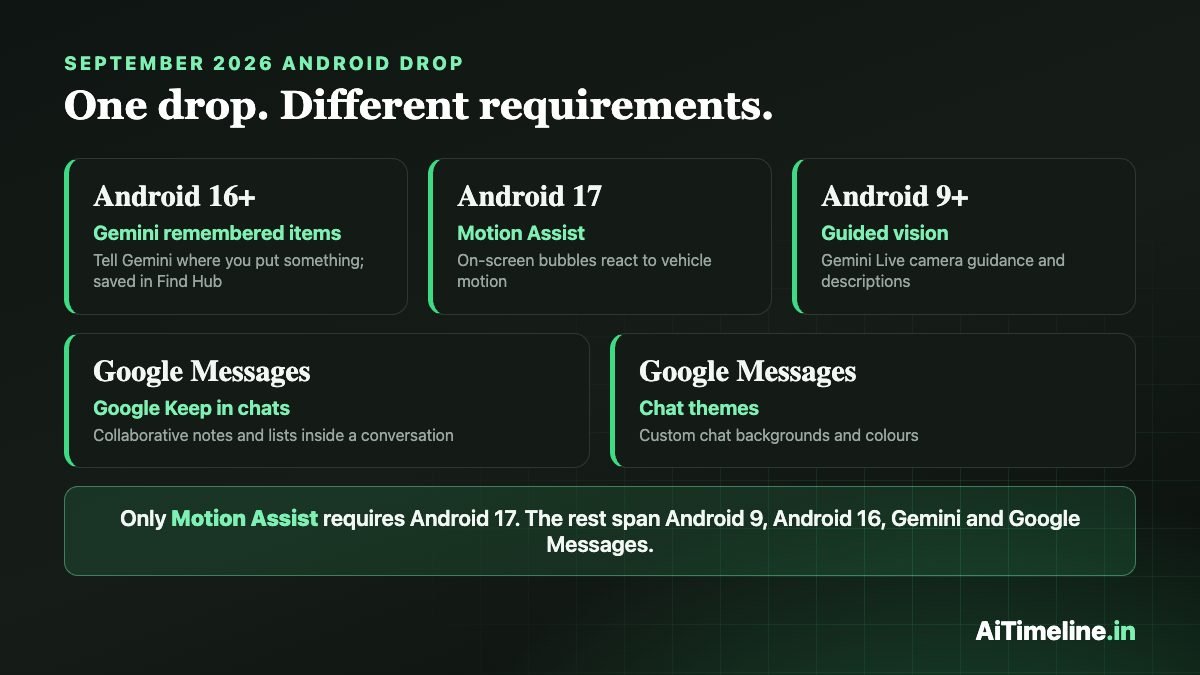
On 1 September 2026, Google shipped the September Android Drop. It is a set of Android and Google ecosystem features delivered without waiting for the next major OS number. Five headline items shipped: Gemini remembered items in Find Hub, Motion Assist, Guided vision, Google Keep collaboration inside Google Messages, and customisable chat themes. Some are AI-powered; others are messaging, productivity and personalisation. It is a September Android Drop with major AI features — not a “massive AI drop,” and not an “Android 17 Feature Drop” unless a specific feature actually requires Android 17.
| Feature | What it does | Android requirement | Status |
|---|---|---|---|
| Gemini remembered items + Find Hub | Saves a physical-item location that the user tells Gemini about | Android 16+ | 🔵 Rolling out by supported country |
| Motion Assist | On-screen bubbles react to vehicle motion to help reduce motion sickness | Android 17 | 🟢 Available on supported phones |
| Guided vision | Gemini Live camera guidance and spoken descriptions | Android 9+ | 🟡 Coming soon |
| Google Keep in Messages | Collaborative notes and lists inside a conversation | Supported Google Messages | 🔵 Rollout started 1 Sept |
| Chat themes | Custom chat backgrounds and colours | Google Messages | 🟢 Available |
⚠️ The correction that matters most here
It is wrong to say “Android 17 introduced all the September 2026 features.” They span the Android platform (versions 9, 16 and 17), Gemini, Find Hub and Google Messages. Only Motion Assist actually requires Android 17. Guided vision is planned for Android 9 and above; remembered items need Android 16 or newer.
Does Android Now Know Where Your Passport Is?
Only if you tell it. The remembered-items feature does not have the phone silently watching where you leave objects. The model is user-initiated: you say something like “Remember in Find Hub that I put my passport in my bedroom drawer” — optionally adding a photo — and Gemini saves that location to Find Hub. Later you can ask where it was stored. That is very different from ambient visual surveillance.
User-initiated memory — not automatic tracking. Requires Android 16+, in countries where both Gemini and Find Hub are supported.
Motion Assist
Motion Assist adds subtle moving bubbles to the display. The bubbles move with the vehicle’s motion, reducing the conflict between what your eyes see on a still screen and what your inner ear feels in a moving car. It can be set to activate automatically and can be customised. It is designed to help reduce motion sickness — not to cure, prevent or eliminate it. Motion Assist requires Android 17.
Guided Vision: Gemini Can Help You Aim the Camera
Guided vision uses Gemini Live camera sharing plus voice feedback, designed with and for blind and low-vision communities. It can help with tasks such as reading fine print, identifying household objects, or framing an object or a menu in the camera view. Availability: coming soon to Android 9 and above, in countries where Gemini is available — it is not an Android 17 exclusive.
⚠️ Google’s safety caveat
Guided vision can make mistakes. It is not intended as a mobility or navigation aid, and not a replacement for safe-travel guidance or a trained assistant.
The Bigger 2026 Story: Gemini Intelligence
The September Drop is not Android’s biggest 2026 AI milestone. The larger architectural shift happened in May–June 2026. On 12 May 2026, at the Android Show, Google introduced Gemini Intelligence and described Android as transitioning from an operating system to an intelligence system. The core concepts: proactive assistance, multi-step automation across selected apps, context, cross-device AI, a mix of on-device and cloud intelligence, and user control. It rolls out in waves, starting with selected advanced Samsung Galaxy and Google Pixel devices, and expanding to other Android form factors — watches, cars, glasses and laptops — later.
Do not say every Android phone has Gemini Intelligence. Availability depends on device capability, memory, the system-on-chip, on-device AI support, country and software rollout. The accurate phrasing is select or qualifying devices. Google’s own security framing rests on three principles: explicit user control, comprehensive data protection, and operational transparency.
Android 17: The Architectural Shift
Android 17 was released on 16 June 2026, initially to supported Pixel devices, with other eligible manufacturers following through 2026. Google positions it as the beginning of Android’s transition to an intelligence system — the key 2026 OS milestone. But it is not only an AI release. Verified consumer changes include floating Bubbles, Screen Reactions, foldable gaming enhancements, temporary precise-location access, sharing with a specific contact, an enhanced “Mark as lost,” Advanced Protection enhancements and per-app memory limits. The developer story is adaptive-first development, AppFunctions, agent integration architecture, a Compose-first direction, and privacy and security improvements.
The Android 17 Feature That Could Matter More Than the UI
AppFunctions. An app can expose approved capabilities as structured tools — a notes app could expose “create note,” paired with a natural-language description. An AI assistant can then discover that function and, with permission, invoke it. This creates a path toward AI agents working across applications without the user needing to know which app holds the function.
📱 Old Android
- User
- Opens app
- Taps button
- Action happens
🤖 Intelligence-system Android
- User intent
- Gemini / agent
- Discovers an exposed app function
- Permission prompt
- App function runs → result
Only supported, exposed functions — and only with permission.
⚪ Important status
Gemini’s integration with Android AppFunctions was in private preview with trusted testers as of the Android 17 launch. Do not say Gemini can already control every Android app, or that this integration is universally live.
From App Launcher to App Orchestrator?
The question mark is deliberate. Historically, Android helped users find and open apps. Future Android could increasingly orchestrate capabilities inside apps. That is analysis, not a shipped fact — but it is grounded in the AppFunctions architecture rather than in any single consumer feature. Motion Assist is a nice bubble effect; AppFunctions plus Gemini Intelligence is the stronger basis for calling any of this “agentic.”
The Five Eras of Android
Version numbers tell you when; eras tell you what changed
| Era | Versions | Main shift | Typical hardware |
|---|---|---|---|
| Foundation | 1.0–2.3 | Apps, notifications, widgets, smartphone basics | Keyboards, trackballs, early touchscreens |
| Unification & design | 3.x–5.x | Tablet/phone convergence, Holo, Google Now, Material Design | Full-touch phones and tablets |
| Maturity & control | 6–10 | Runtime permissions, battery optimisation, multi-window, modularity, gestures | Edge-to-edge phones, biometrics |
| Personalisation & ecosystem | 11–14 | Conversations, Material You, privacy controls, foldables, cross-device features | Foldables, wearables, large screens |
| AI & intelligence system | 15–17 | Gemini, on-device AI, proactive assistance, agent-ready app functions | AI accelerators, foldables, connected devices |
Google Tensor is Pixel silicon, not the hardware paradigm for all Android. Other OEMs use Qualcomm, MediaTek, Samsung and other platforms.
Android Was Using AI Long Before Generative AI
Google Now was a contextual-cards service, not a large language model. Gemini Nano is not identical to cloud Gemini.
The Design Eras
Material Design is not only an Android design system — it expanded across Google’s products and platforms.
Why Your Android Phone Gets Features Without a New Android Version
Users often ask “does Android 17 have X?” when X actually arrives through another layer entirely. A major Android version changes platform and framework APIs and system behaviour. An Android Drop can deliver Google and Android ecosystem features without waiting for the next OS number. A Pixel Feature Drop is often device-specific and should not be confused with an Android Drop. And Google Messages features are not core OS APIs.
Android Had to Learn That a Phone Screen Could Change Size
Foldables forced real platform work: adaptive layouts, better multi-window, a taskbar, and large-screen behaviour that assumes the screen can resize mid-session. Android 17’s adaptive-first developer direction is the continuation of that. Android’s influence now spans phones, tablets, foldables, watches, cars, TV, XR and glasses, and other connected devices — but not every platform runs an identical Android build.
Android and iPhone: A Timeline, Not a Feud
Android had a pull-down notification shade from its earliest generation; iOS later introduced Notification Center. Android established on-screen system navigation as a core design option; many manufacturers kept hardware or capacitive buttons for years. These are timeline facts. Android did not invent smartphones, touchscreen navigation or notifications, and “Apple copied Android” is not a claim this article makes without careful sourcing.
Every Android Version, 1.0 to 17
| Version | Year | Public name | Signature change |
|---|---|---|---|
| 1.0 | 2008 | — | G1, Android Market, notification shade |
| 1.5 | 2009 | Cupcake | On-screen keyboard, home-screen widgets, video capture |
| 1.6 | 2009 | Donut | Broader screen and device support, search |
| 2.0/2.1 | 2009–10 | Eclair | Google Maps Navigation, camera, accounts |
| 2.2 | 2010 | Froyo | Performance (JIT), Wi-Fi hotspot / tethering |
| 2.3 | 2010 | Gingerbread | Refined smartphone UI, NFC platform support |
| 3.x | 2011 | Honeycomb | Tablet-only UI branch |
| 4.0 | 2011 | Ice Cream Sandwich | Phone/tablet unification, Holo, on-screen nav |
| 4.1–4.3 | 2012–13 | Jelly Bean | Google Now, Project Butter |
| 4.4 | 2013 | KitKat | “OK Google,” low-memory optimisation |
| 5.x | 2014 | Lollipop | Material Design, ART runtime |
| 6.0 | 2015 | Marshmallow | Runtime permissions, Doze, Now on Tap |
| 7.x | 2016 | Nougat | Multi-window, direct reply |
| 8.x | 2017 | Oreo | Project Treble, picture-in-picture, notification channels |
| 9 | 2018 | Pie | Adaptive Battery / ML, gesture navigation |
| 10 | 2019 | Android 10 | Numeric naming, full gesture nav, system dark theme |
| 11 | 2020 | Android 11 | Conversations, one-time permissions |
| 12 | 2021 | Android 12 | Material You |
| 13 | 2022 | Android 13 | Per-app languages, expanded theming |
| 14 | 2023 | Android 14 | Health Connect, Ultra HDR, customisation |
| 15 | 2024 | Android 15 | Private Space, theft protection, security |
| 16 | 2025 | Android 16 | Live Updates, Advanced Protection, large-screen work |
| 17 | 2026 | Android 17 | Intelligence-system architecture, Bubbles, AppFunctions |
Dessert names ran from Cupcake (1.5) through Pie (9). Android 10 (2019) moved public branding to numbers for global clarity.
Full Android Timeline (Newest First)
From the September 2026 Drop back to Android 1.0
September Android Drop
What shipped: Gemini remembered items in Find Hub (Android 16+), Motion Assist (Android 17), Guided vision (coming to Android 9+), Google Keep collaboration in Google Messages, and chat themes.
Why it matters: It shows how Android now adds capability between major releases — and why “which Android version” is the wrong first question for many features.
Android 17
What happened: Android 17 reached supported Pixel devices, with other eligible manufacturers following through 2026. Consumer changes include floating Bubbles, Screen Reactions, foldable gaming enhancements, temporary precise-location access, specific-contact sharing, enhanced Mark as lost, Advanced Protection enhancements and per-app memory limits.
Why it matters: Google frames it as the start of Android’s shift from an operating system to an intelligence system — while also shipping privacy, security, performance and large-screen work.
Gemini Intelligence Announced
What happened: At the Android Show, Google introduced Gemini Intelligence and described Android as transitioning to an intelligence system: proactive assistance, multi-step automation across selected apps, context, cross-device AI and user control.
Why it matters: This, not the September Drop, is the year’s defining AI milestone. Rollout is in waves, starting with selected advanced Samsung Galaxy and Google Pixel devices.
Android 16 and Material 3 Expressive
What happened: Android 16 shipped on an earlier annual cadence with Live Updates, grouped notifications, Advanced Protection, hearing-device improvements and desktop-windowing work for large screens. Material 3 Expressive built on Material You with more motion, responsive components and dynamic personalisation.
Why it matters: The design language and the release schedule both moved — and version release is not the same as feature-rollout schedule.
Android 15; AI Moves Deeper In
What happened: Android 15 focused on privacy, security, theft protection, Private Space and fraud detection. In May 2024 Google said it was building AI directly into Android, and Gemini moved deeper into the mobile assistant experience. Google also announced Gemini Nano with multimodality for on-device experiences, with inputs that can include text, images, audio and speech depending on the feature and device.
Why it matters: Gemini experiences use both on-device and cloud processing — not everything runs locally, and it varies feature by feature.
Android 14; Gemini Nano on Pixel 8 Pro
What happened: Android 14 added Health Connect integration, Ultra HDR, lock-screen customisation and data-sharing transparency, plus generative-AI wallpapers on supported Pixel devices. In December 2023, Gemini Nano began running on the Pixel 8 Pro, powering Recorder summarisation and Smart Reply.
Why it matters: Android did not become a generative-AI OS in December 2023. Gemini Nano initially ran on specific Pixel hardware.
Android 13
What happened: Per-app languages, expanded Material You theming, more privacy controls, media improvements, cross-device experiences and large-screen and foldable work.
Android 12: Material You
What happened: Material You brought dynamic colour: the system extracts colours from your wallpaper and applies them across the lock screen, notifications, widgets and apps. Google Tensor also debuted with the Pixel 6 — Pixel’s custom-silicon AI era.
Why it matters: Your wallpaper became the design system. Tensor is Pixel silicon, not Android’s general hardware architecture.
Android 11
What happened: Conversations section in notifications, notification organisation, built-in screen recording, device controls and one-time permissions.
Android 10: Numbers Take Over
What happened: Android Q became Android 10 — dessert names disappeared from public release branding to make names globally clearer. Full gesture navigation, granular privacy and location controls, and a system-wide dark theme.
Android 9 Pie
What happened: Adaptive Battery and Adaptive Brightness used on-device machine learning; Google worked with DeepMind on Adaptive Battery. Pie also began the move toward gesture navigation.
Why it matters: Android’s use of AI did not begin with Gemini.
Android 8 Oreo: Project Treble
What happened: Project Treble separated the vendor implementation from the Android framework more cleanly, making the update stack more modular. Consumer additions: picture-in-picture, notification channels and autofill.
Why it matters: Android’s biggest historical weakness was fragmentation and update speed. Treble was built to help.
Android 7 Nougat
What happened: Native split-screen multi-window, direct reply from notifications, Data Saver and improved notifications.
Why it matters: Multi-window is the ancestor of today’s foldable and tablet multitasking.
Android 6 Marshmallow
What happened: Runtime permissions moved Android toward asking for sensitive permissions when needed rather than all at install. Doze cut background battery use. Google Now on Tap added contextual assistance inside the current screen.
Android 5 Lollipop: Material Design
What happened: Material Design — cards, elevation, motion, layers and responsive interaction — was previewed at Google I/O 2014 and came to Android with Lollipop, which also replaced Dalvik with the ART runtime. The same year, Android Wear, Android Auto and Android TV expanded Android beyond the phone.
Why it matters: Android was becoming an ecosystem, and Material Design expanded across Google’s products, not just Android.
Android 4.4 KitKat
What happened: “OK Google” voice interaction, a lighter UI, and performance work so Android ran on devices with as little as 512MB of RAM.
Why it matters: The always-listening voice-command era connects directly to later assistants.
Android 4.1 Jelly Bean: Google Now
What happened: Google Now delivered contextual, predictive information — weather, commute time, appointments. Project Butter targeted smoother animations and interface responsiveness.
Why it matters: Google Now → Google Assistant → Gemini is the through-line of Android’s AI story.
Honeycomb and Ice Cream Sandwich
What happened: Android 3.x Honeycomb was a tablet-only branch that created a phone/tablet split. Android 4.0 Ice Cream Sandwich reunited them into one platform for phones and tablets, with the Holo visual language, virtual system navigation, swipe interactions, data-usage tools, Face Unlock and improved notifications.
Why it matters: ICS established on-screen system navigation as a core Android design option — it did not permanently remove physical buttons; many OEMs kept them.
Froyo and Gingerbread
What happened: Android 2.2 Froyo added JIT performance, Wi-Fi hotspot and tethering, and browser improvements. Android 2.3 Gingerbread refined the smartphone UI, added NFC platform support, better power management and gaming and media APIs.
Why it matters: Gingerbread was one of Android’s defining early smartphone eras.
Cupcake, Donut, Eclair
What happened: Android 1.5 Cupcake added on-screen keyboard improvements, home-screen widgets and video capture, and marked the start of the public dessert-naming tradition. Android 1.6 Donut broadened screen and device support and improved search. Android 2.0/2.1 Eclair brought Google Maps Navigation, camera improvements, multiple-account support and UI refinement.
Why it matters: Android was becoming a platform for many manufacturers, not one phone.
Android Arrives in Your Pocket
What happened: The T-Mobile G1 — also known as the HTC Dream — shipped with Android 1.0, the first Android smartphone, with the Android Market alongside it. It had a physical keyboard, a trackball and a 3.2-inch screen.
Why it matters: Features that became central to Android were here from the start: a pull-down notification shade, multitasking, sharing between apps, deep Google integration and an app store. Android did not invent every one of these, but it made them central.
📝 Update Log
- 3 September 2026 — Full rewrite: replaced the “HTC Dream to AI era” draft with a version-by-version timeline, added the September Android Drop availability matrix, the Gemini Intelligence and AppFunctions sections, the five-era matrix and the update-layers explainer.
- 1 September 2026 — September Android Drop: remembered items, Motion Assist, Guided vision, Keep collaboration, chat themes.
- 16 June 2026 — Android 17 released.
- 12 May 2026 — Gemini Intelligence and the intelligence-system strategy.
- 10 June 2025 — Android 16.
- October 2024 — Android 15 reaching Pixel devices.
- December 2023 — Gemini Nano on the Pixel 8 Pro.
- October 2023 — Android 14.
Explore More Timelines
People Also Ask
Frequently Asked Questions
Related AiTimeline Coverage
⚠️ Editorial and Accuracy Note
This timeline draws first on official Google, Android and Android Developers sources, with technical publications used for context. Each current feature is labelled by layer — Android platform, Google app, Pixel feature, Gemini feature or Android ecosystem update — and by availability status. “Addressable direction” is not a shipped feature, “private preview” is not “generally available,” a Pixel feature is not a universal Android feature, and “intelligence system” is Google’s description of a direction, not an official product name. No Android 18 has been announced. Figures and rollout states were verified as of 3 September 2026 and will change as rollouts proceed.
Sources & further reading
Every dated entry above was checked against these references. Last reviewed 15 September 2026.